The AxamyOne platform / CRM + ATS

Every part of recruitment.
Working as one.

From the first candidate conversation to the final invoice. Connect your people, training, compliance and placements in a recruitment CRM configured around your agency.

CRM + ATS Temporary + permanent UK recruitment

One workspace. The whole agency.

Actual AxamyOne interface. Illustrative demo data.

01 / Candidates & clients

Know the person.
See the whole picture.

Find people with the right context, not just a matching keyword. Bring location, availability, school relationships, previous work and readiness into the same recruitment conversation.

Candidate search · Education-configured fictional demo
School radius search

Select a School and search within 1–30 miles. Combine your existing Candidate filters and see the nearest people first, with distance shown.

Recognise the relationship

A Worked Here badge identifies completed work at that School. Cancelled, provisional and unfilled bookings do not count.

Respect the restriction

School-specific Do Not Use controls exclude a Candidate from that School’s searches, matches and booking selection—not from other Schools. Existing bookings remain visible with warnings.

02 / Compliance & onboarding

Know the next action.
Protect the next placement.

Keep Interviewed status, completed onboarding and Vetting distinct. Structured Work History, derived References and evidence requests give your team the context to review—not just a folder of uploads.

Your requirements
Configure Compliance Groups, Required and Optional checks, Internal checks, evidence and review dates around your agency.
A useful Priority view
Focus on manual priorities, upcoming work and relevant document expiry while keeping outstanding checks and Request Missing Evidence in view.
Plan conditionally. Clear before work.
A Conditional Booking plans future work while checks are outstanding. It does not allow an uncleared Candidate to work. Clearance to Work remains a separate controlled decision.
Explore managed configuration Explore built-in Training & safeguarding
Compliance workspace · Illustrative demo data
AxamyOne Training / Built into your CRM

Develop your people.
Keep safeguarding central.

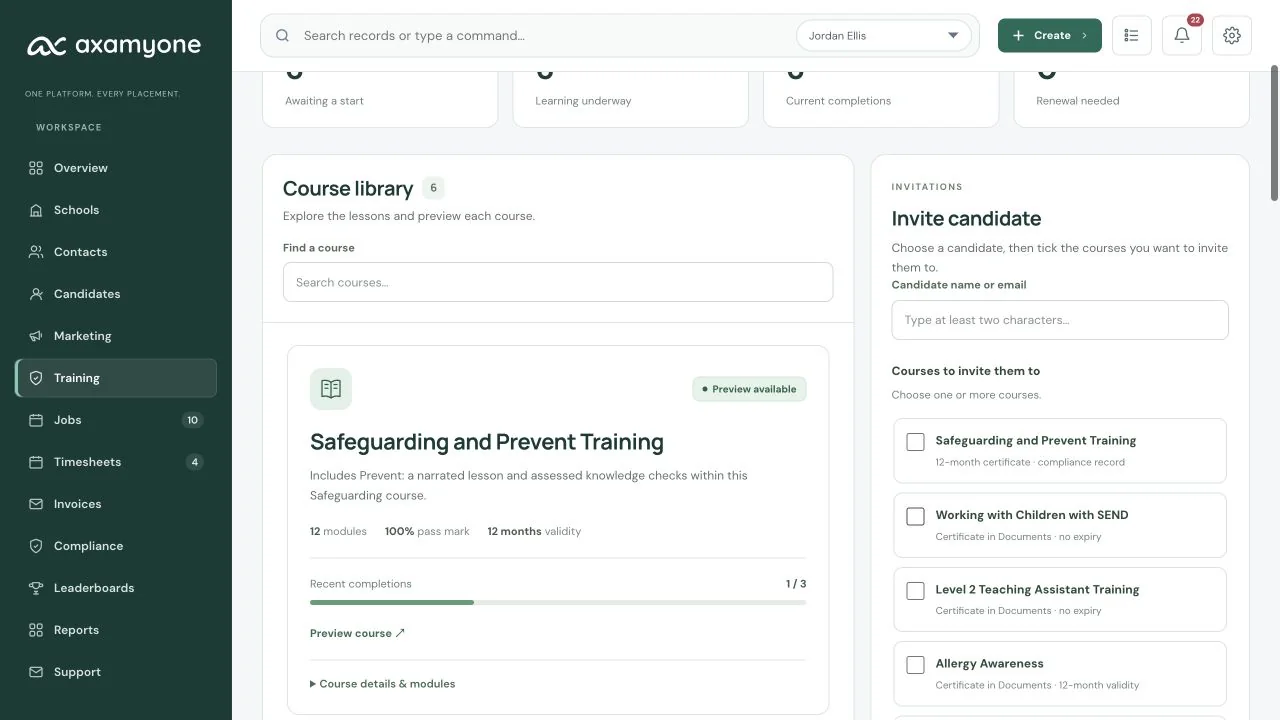
Six education courses. Narrated video lessons, captions, transcripts, scenarios and assessments in the Candidate Portal, with progress and certificates connected to the CRM.

Flagship course / Safeguarding

Safeguarding &
Prevent Training

One introduction, twelve narrated lessons, module assessments and a final assessment. Prevent is part of this course, with deeper reading, realistic scenarios and assessed decision-making—not a separate course to manage.

12 + intro
Narrated lessons
12 months
Certificate expiry
Connected to compliance

Completion creates a PDF certificate attached to the candidate’s Safeguarding Training compliance check, with a twelve-calendar-month expiry.
10 modules / Introductory CPD

Working with Children
with SEND

In-house CPD introducing ways to support children with special educational needs and disabilities.

Certificate emailed to the candidate and saved in Documents. No expiry.

10 modules / Introductory CPD

Level 2 Teaching
Assistant Training

An introduction to the teaching assistant role and supporting pupils in the classroom.

Certificate emailed to the candidate and saved in Documents. No expiry.

Introductory, in-house CPD, not an Ofqual-regulated qualification or an accredited Level 2 award.

Awareness & response

Allergy Awareness

Recognising risk, following individual plans, preventing exposure and responding within your role.

Certificate saved in Documents, with a twelve-calendar-month expiry.
Classroom practice

Cover Supervisor Training

Prepare for the lesson, establish expectations, support pupils and hand over clearly to the school.

Certificate saved in Documents. No automatic expiry.

Consistent support

Behaviour Management Training

Build predictable routines, understand behaviour, de-escalate appropriately and reflect on practice.

Certificate saved in Documents. No automatic expiry.

Training Hub · Current six-course library
Current AxamyOne Training Hub showing the library count and Safeguarding and Prevent course card
A consistent learning experience

Narrated video lessons, captions and transcripts in a mobile-first experience.

100% requiredEvery scored assessment stage, across all six courses.

From invitation to evidence. In one workflow.

  1. Assign in the CRM

    Send a course invitation from the candidate profile or Training hub.

  2. Learn in their portal

    Candidates find their assigned courses in their own candidate portal, with lessons and assessments together.

  3. Keep learning moving

    Automatic four-day reminders begin after the invitation email is sent successfully, while the assignment remains eligible.

  4. Close the safeguarding loop

    Safeguarding completion sends an email and in-app notification to the eligible assigned compliance officer, falling back to the candidate’s eligible consultant owner.

Map the supported courses to your chosen Compliance checks, or keep the document record without a mapping. Safeguarding completion updates its training check—not other checks or overall clearance. These are in-house CPD/completion certificates, not external accreditation. No-expiry certificates do not establish ongoing competence or replace your review requirements.

See Training in your demo
03 / Jobs, bookings & placements

Two recruitment models.
One connected operation.

Run your temporary desk and permanent pipeline in the same platform, with the relevant candidate, client and commercial context close at hand.

Temporary recruitment

From availability to approved work.

Manage availability, Conditional Bookings and confirmed assignments, then connect cleared work to Timesheets and client approvals.

  1. Availability
  2. Clearance
  3. Booking
  4. Timesheet
Permanent recruitment

From opportunity to placed candidate.

Keep Jobs, Client Interviews, Trial Days, outcomes, offers and Placements connected. Use the stages that fit the role rather than a compulsory pipeline.

  1. Job or Advert
  2. Interview
  3. Trial if needed
  4. Placement
Bookings workspace · Illustrative demo data
The conversation. The experience. The outcome.

Give the next step
its own place.

A scheduled Client Interview is different from marking a Candidate internally as Interviewed. Keep real appointments and Trial Days alongside the work they may lead to.

Client Interviews

Everyone knows the plan.

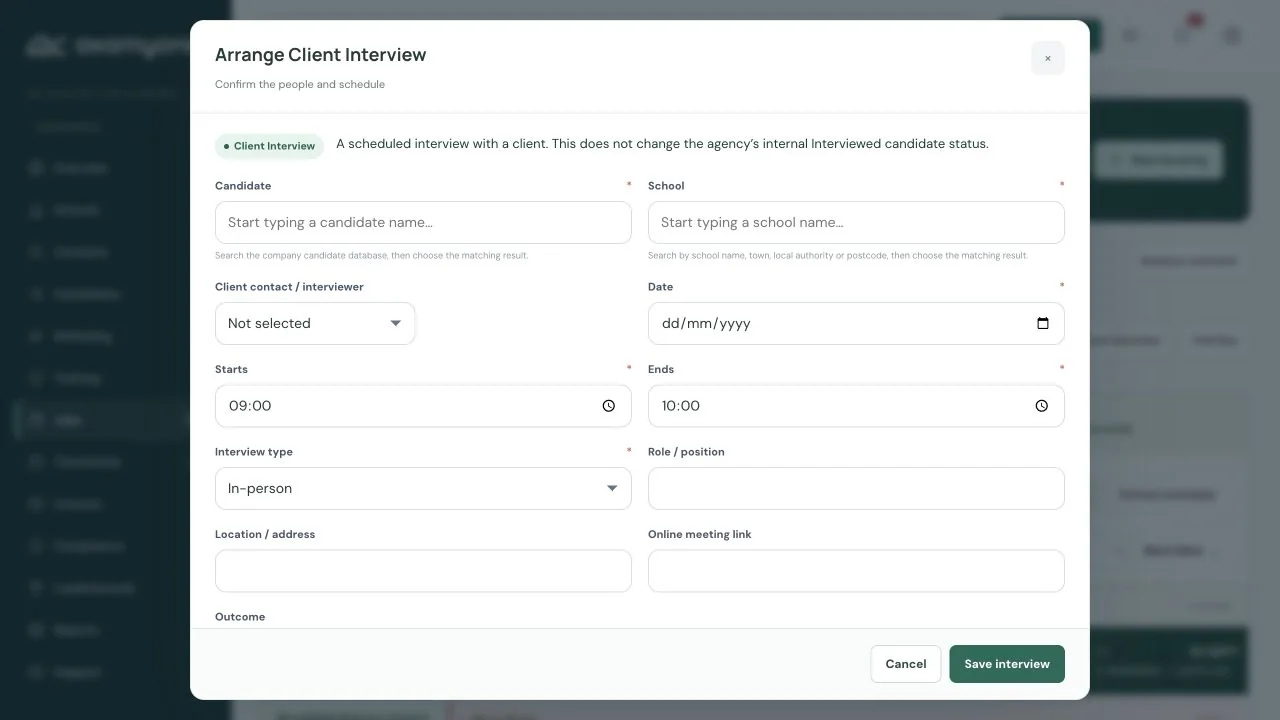
Link the Candidate and School/client, date and time, contact or interviewer, location or online details. Record status and outcome, with the appointment visible in Work View.

Client Interview form in the current AxamyOne demonstration workspace
Scheduled Client Interview · Fictional demo data
Paid & Free Trial Days

Try the fit. Keep the context.

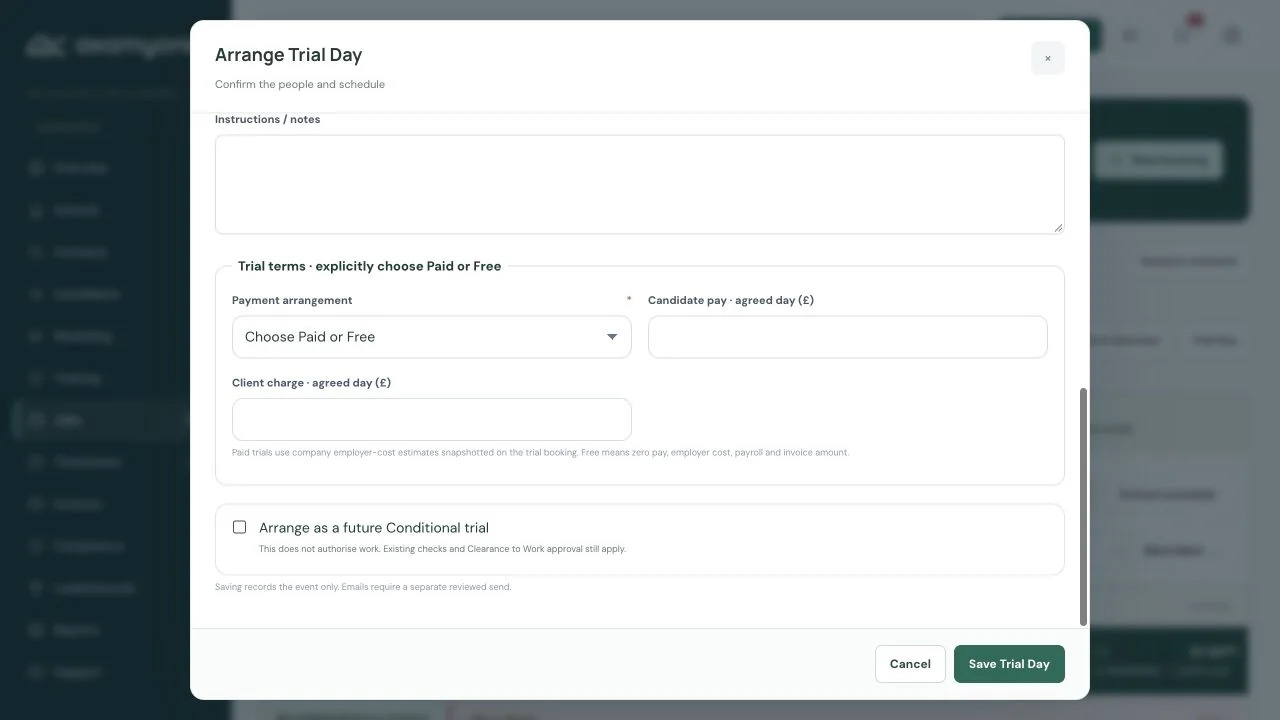
Progress from Interview to Trial, capture an outcome and move towards a Booking or Placement. Paid Trials use the agreed economics; Free Trials stay separate from payroll and invoice values. Both require the same clearance before work.

Trial Day form showing the current paid and free workflow in AxamyOne
Trial Day planning · Fictional demo data
School-facing weekly schedule

A clear week for the school.
No internal detail attached.

Select a School and week from Work View or its School record. Review confirmed staffing, Conditional assignments, Trial Days and unfilled positions, then download a professionally branded weekly PDF.

The PDF excludes internal financial, Compliance and private data. Interviews remain in Work View, not the School staffing PDF.

04 / Timesheets, invoicing & reporting

Know the cost.
Understand the margin.

Candidate pay and Client Charge stay connected to approved work. For applicable PAYE Bookings, company-wide employer-cost estimates bring employment cost, Gross Profit and Gross Margin into view.

  1. 01Configure once

    An authorised Admin sets the company’s employer-cost components. Applicable PAYE bookings use them automatically—not umbrella arrangements.

  2. 02Keep the agreed economics

    Each Booking snapshots the component percentages used. Later settings changes do not silently change historical margins.

  3. 03Approve & export

    Weekly payroll-ready CSV exports contain exact approved Candidate gross pay from Timesheets. Billing and reporting stay connected.

Profitability estimates, not statutory payroll.

AxamyOne does not calculate statutory payroll deductions or run payroll. Your payroll provider/process remains responsible for those calculations.

Authorised Finance users can correct an approved, uninvoiced full day to a half day with an audit reason. Pay becomes 50%; costs use the Booking’s snapshot and Client Charge is recalculated to preserve the original Gross Margin %. Invoiced work remains locked to the existing credit-note process.

Approved Timesheets · Figures are fictional demonstration data, not customer results
05 / Portals & communications

An opportunity.
A simple response.

Send vacancy outreach to selected Candidates. They receive the opportunity by email and can see it in their Candidate Portal, then choose “I’m interested” without submitting another CV.

Interest reaches the consultant
Responses return to the CRM and notify the consultant by email. Interest is separate from a formal Application; closed or filled opportunities no longer accept interest.
More than an inbox
Branded Candidate and Client Portals also connect onboarding, evidence, learning, availability, bookings, Timesheets and approvals.
Your agency, recognisably
Keep supported Microsoft 365 email, templates and personal signatures connected to the recruitment record.
Example agency branding · Illustrative demo workspace
Thoughtful follow-up. Less remembering.

Keep the personal touch.
Make room for the day.

Outlook follow-up reminders
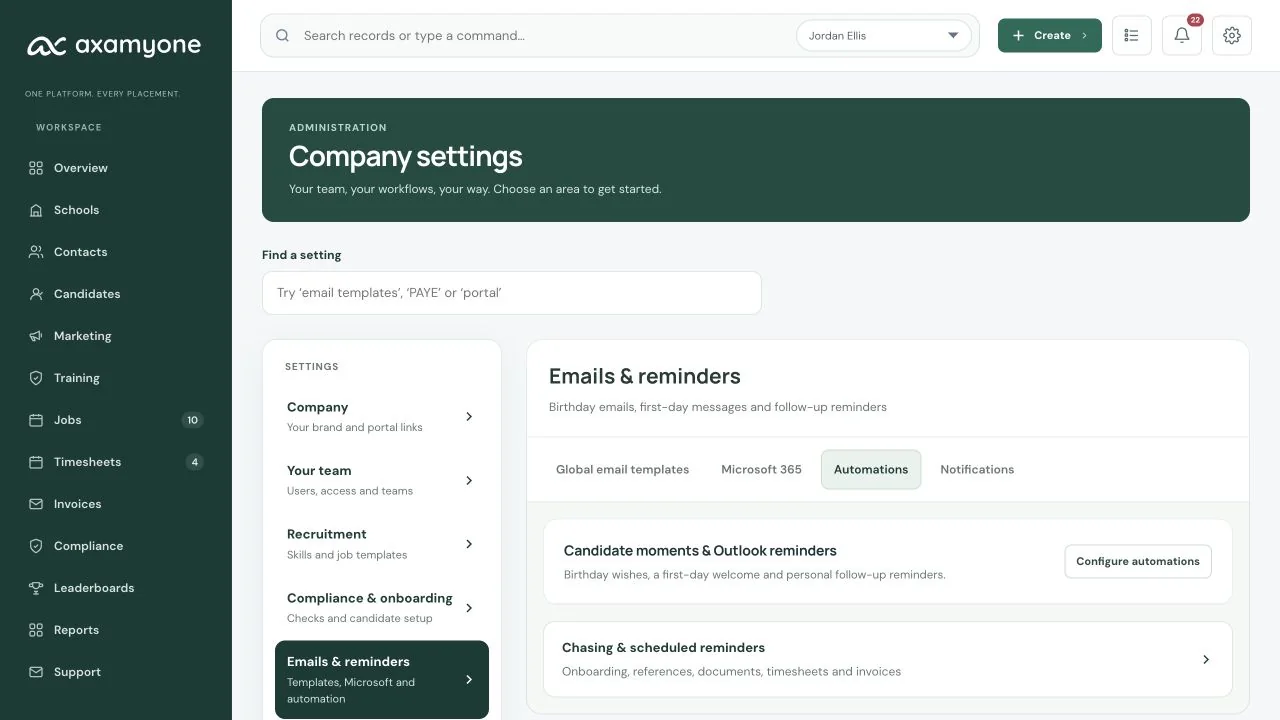
Timed CRM Tasks can sync to the responsible consultant’s own connected Outlook Calendar and update when the Task changes. Each user consents to their own calendar; this is not unrestricted organisation-wide access or two-way calendar sync.
Candidate birthdays
Enable a birthday message from the Candidate’s assigned consultant’s verified personal Microsoft mailbox.
The first working day
Send a first-day message from the Booking’s assigned consultant for confirmed, cleared work. Cancelled or uncleared work does not trigger it.

Automations are configurable and require the relevant setup. If the assigned consultant has no eligible verified mailbox, the message remains unsent—there is no shared-mailbox fallback.

Company Automation overview
Current AxamyOne company Automation overview and configuration entry points
AxamyOne CRM + AxamyOne Jobs

Start with a Job.
Or start with an Advert.

AxamyOne Jobs is the connected public jobs marketplace. Publish an existing CRM Job, or create a standalone Advert before a Job exists. Applications and advertising history stay connected if you later convert that Advert to a Job.

Active AxamyOne CRM customers can advertise through the AxamyOne Jobs Growth plan at no additional platform cost while their CRM subscription remains active.

Explore AxamyOne Jobs
Publish an existing roleCRM Job → AxamyOne Jobs → Applications
Advertise before you create a JobStandalone Advert → Applications → Optional Job conversion

Public Applications are distinct from “I’m interested” responses to vacancy outreach sent to your existing Candidates.

The detail behind the workflow

Good questions.
Clear boundaries.

How is a Client Interview different from Interviewed status?

Interviewed is an internal Candidate lifecycle status. A Client Interview is a scheduled event linking a Candidate and client, with a date, time, interviewer or contact, meeting details and outcome, visible in Work View.

Can we arrange paid and free Trial Days?

Yes. Paid Trials use agreed Booking economics. Free Trials remain separate from payroll and invoice values. Both follow the same clearance rules before work; a future Conditional Trial is not permission for an uncleared Candidate to work.

Do we need a Job before publishing an Advert?

No. Publish an existing Job or create a standalone Advert. You can receive Applications first, then optionally convert the Advert into a Job while retaining Applications and history.

Does vacancy outreach require another CV?

No. Selected Candidates receive the opportunity by email and in their portal and can choose “I’m interested”. The consultant receives the response in the CRM and by email. This is interest, not a formal Application.

Does Outlook sync read every employee’s calendar?

No. Timed follow-up Tasks sync to the responsible consultant’s own connected calendar with their consent. CRM Task changes update the linked reminder; this is not unrestricted organisation-wide access or two-way calendar synchronisation.

Who sends birthday and first-day emails?

When enabled and configured, the Candidate’s assigned consultant sends birthday emails and the Booking’s assigned consultant sends first-day emails through their verified personal Microsoft mailbox. Missing eligible setup leaves the message unsent, with no shared-mailbox fallback.

Does AxamyOne run payroll?

No. Company-configured employer-cost percentages estimate Booking employment cost and Gross Margin. Exact approved Candidate gross pay is available in a weekly payroll-ready CSV; the payroll provider or process performs statutory calculations.

Can we share a School’s weekly staffing plan?

Yes. Select the School and week and download a branded PDF of staffing, Conditional assignments, Trials and unfilled positions. It excludes internal financial, Compliance and private information.

What does Candidate Training include?

Six courses include Safeguarding & Prevent, Allergy Awareness, Cover Supervisor, Behaviour Management, Working with Children with SEND and introductory Teaching Assistant CPD. Candidates use narrated lessons and assessments in their portal; your team follows progress and certificates in the CRM. Safeguarding & Prevent and Allergy Awareness certificates expire after twelve calendar months. These are completion certificates, not external accreditation.

One platform. Your way of working.

The right capabilities.
Configured for your agency.

Workflows, terminology, compliance, teams, permissions, branding and reporting are agreed as part of managed implementation.

See the platform through the lens of your sectors, your recruitment model and the people who use it every day.